
Adapting a Rigid or Required Lesson Plan Template
A required lesson plan template should be adapted by keeping every mandatory heading, field and evidence requirement intact, then changing only the lesson-specific wording, detail or placement that the issuing rules permit. Match each activity to the field’s instructional purpose; if no suitable field exists, use a permitted note or sublabel, or confirm the rules before changing the structure.
Required-template adaptation decision guide
Use the problem you see in the form to choose the least structural response that still satisfies the issuing rules.
- Required heading, field or evidence
- Keep it as specified. Change it only when the issuing rules explicitly allow that change.
- Field order differs from the lesson sequence
- Record each lesson element in its required field. Do not reorder the required structure unless the format permits it.
- Essential information has no exact field
- Use the closest functional field when permitted. If no suitable field exists, use a permitted note or sublabel; otherwise confirm the instructions before altering structure.
- Two fields appear to repeat the same information
- Shorten duplication only when concise wording is permitted and every separately required fact remains recorded.
- Lesson-specific content is flexible
- Adapt wording, examples, activity detail or level of detail within the field’s purpose and the permission granted by the form.
Decision rule: adapt content before structure. When permission for a structural change is unclear, verify the applicable instructions first.
The controlling distinction is requirement versus permission: adaptation changes lesson-specific content inside the prescribed form; it does not redesign the form unless the issuing rules allow that change. Because permission can vary between schools, systems, programs and individual forms, diagnose the mismatch before editing.
Table of Contents
Diagnose Where the Required Template Conflicts With the Lesson
Before choosing a correction, classify the template conflict by identifying which kind of mismatch is present.
A required field may conflict with the lesson sequence, provide no suitable place for necessary lesson information, or demand repeated detail; the diagnostic check should identify the documentation mismatch rather than treat an awkward field as evidence that the whole template is unsuitable.
The image separates these three mismatch signals by showing where they occur in a simplified required template before any corrective choice is made.

Use each required field as the point of comparison.
A sequence mismatch is indicated when the lesson information has a suitable field but the field order differs from the lesson sequence; a missing field is the relevant interpretation when necessary lesson information has no suitable destination; repeated detail is indicated when the same or substantially overlapping information appears to be requested more than once.
The differentiating criterion is therefore whether the mismatch concerns order, destination, or duplication, which identifies the next placement decision without yet choosing a correction.
- Order mismatch: The signal is that lesson information has a required field, but its position differs from the lesson sequence. Check whether that field is still an appropriate destination; if it is, the next decision concerns where the information belongs within the required field arrangement.
- Missing destination: The signal is necessary lesson information with no clearly suitable required field. Check whether an existing field genuinely covers that information; if none does, the next decision concerns where the information can be recorded.
- Duplication or detail burden: The signal is the same or overlapping lesson information appearing to be requested in multiple places or at greater detail than expected. Check whether the fields actually request distinct information; if they do not, the next decision concerns the placement of repeated detail without assuming that it can be omitted.
Required Fields Do Not Match the Lesson Sequence
The required field order does not necessarily mirror the lesson sequence or instructional sequence.
When the template records information in one documentation order while the lesson uses a different teaching order, the mismatch affects where lesson information is recorded rather than establishing that either sequence is incorrect.
The comparison graphic separates the fixed field order from the teaching order while showing where related information is recorded.
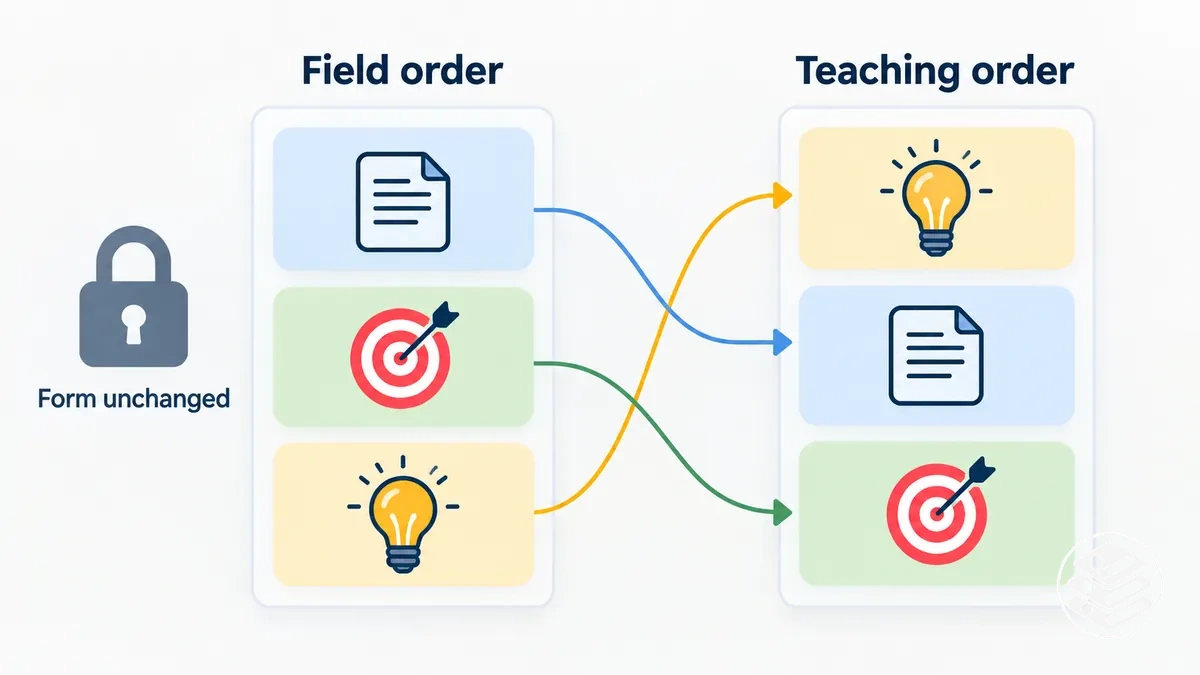
For example, a lesson might introduce a concept, move into a guided activity, and then check understanding, while the required structure places the corresponding fields in a different documentation order.
The teacher can record each part in its required field even though the form order differs from the teaching order; that difference alone does not authorize reordering the required structure unless the governing format permits it.
Important Planning Information Has No Suitable Field
Essential planning information can create a placement gap when it has no suitable field in the required form.
The gap matters when the information has an instructional function needed to understand or carry out the planned lesson, but none of the available fields provides an exact destination for recording it.
The annotated example shows this field-fit problem without implying that a lesson component is missing.
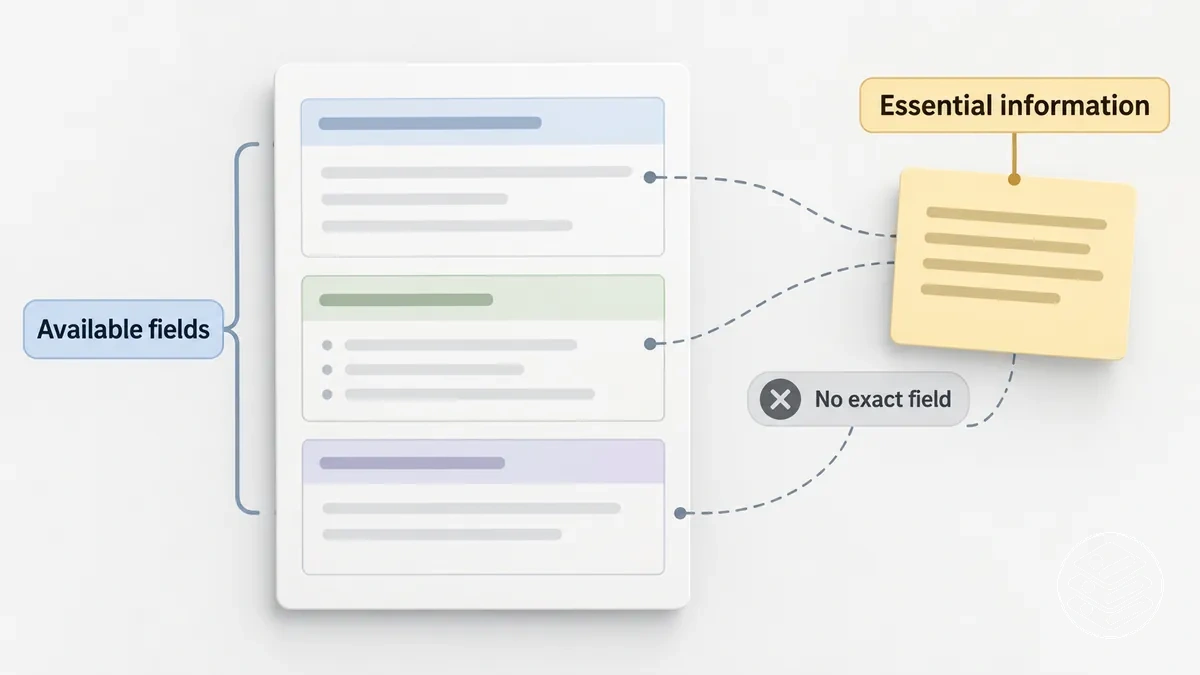
For example, a planning note about how a particular activity will be carried out may be essential if omission would leave the intended instructional action unclear, yet it may not fit the purpose of any available field.
Optional commentary that does not affect understanding or execution of the lesson does not create the same omission consequence; where essential information lacks an exact destination, a placement decision is required, but the placement gap alone does not authorize creating a new section in the required format.
Required Fields Demand Repeated or Excessive Detail
Repeated required detail can occur when overlapping fields ask for the same lesson information or when a field requires more detail than another field with a similar purpose.
The annotated example compares repeated wording with concise wording while holding the required information constant.
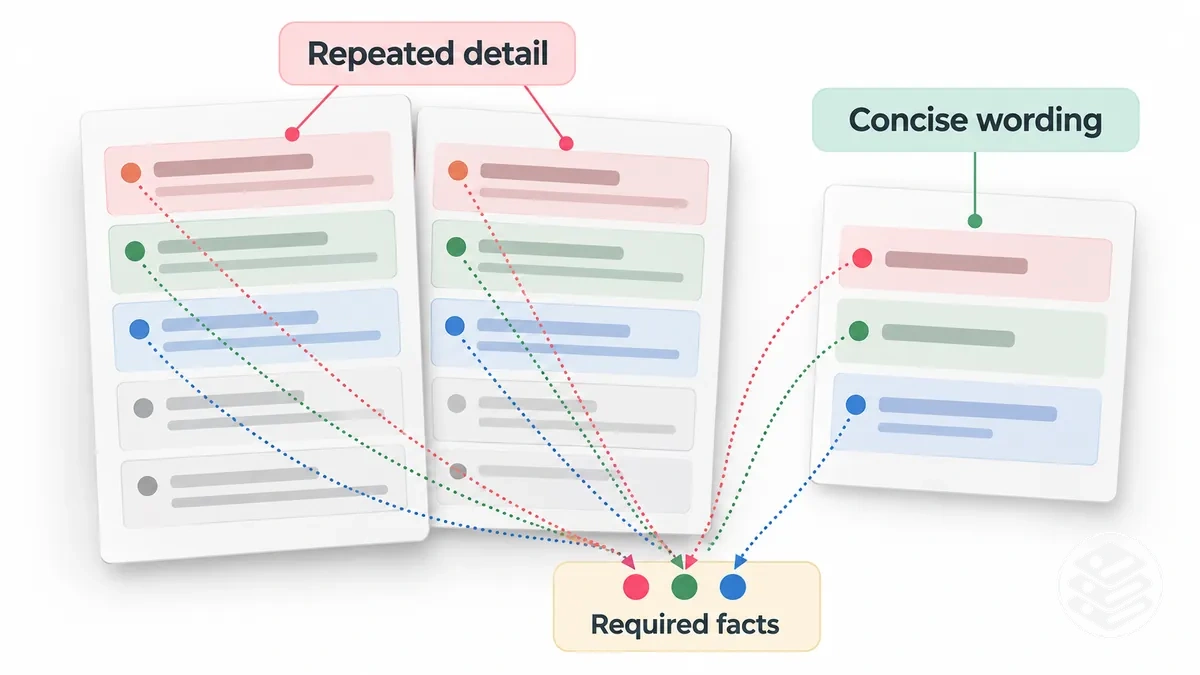
The distinction depends on field purpose: repeated information that satisfies a separate requirement is mandated content, while duplication may be tightened when the required format permits concise wording and every required fact remains recorded.
For example, where two overlapping fields require the same instructional action, the wording can be shortened without dropping that action only if neither field requires additional detail; brevity does not override the applicable local requirements.
Separate Non-Negotiable Requirements From Flexible Content
Identify each non-negotiable requirement from the issuing rules before changing the required lesson plan.
A mandatory heading, required field, or required evidence must remain as specified, while flexible content may be adapted only where the school, system, program, or form permits the change.
The annotated example shows this distinction by separating fixed requirements from content areas whose editing depends on permission.
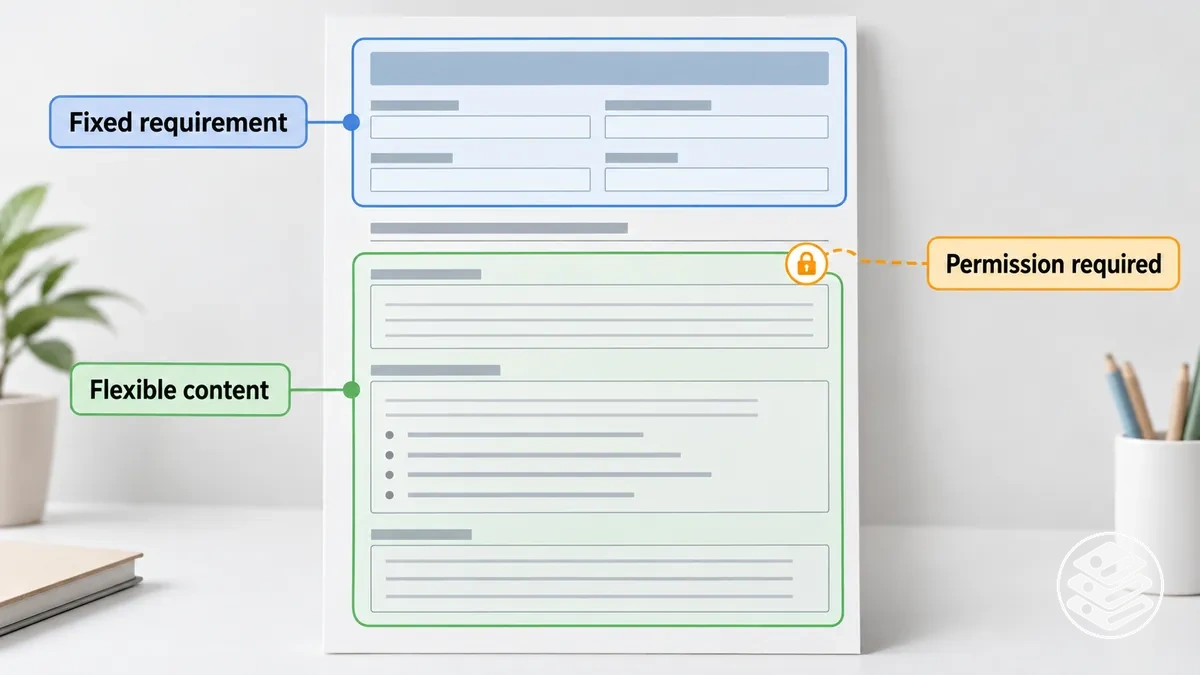
Classify each part by its requirement or permission state rather than by whether it looks editable.
The criteria below separate fixed structure from changes that depend on permission, moving from mandatory elements to wording flexibility, ordering flexibility, and permitted notes.
Each criterion determines what can be edited without assuming that visual appearance establishes permission.
For example, a required heading may stay exactly as issued while the lesson-specific content beneath it changes to describe the planned activity, provided that the issuing rules permit that content to vary.
Deciding whether a different format would be preferable is a separate task when you evaluate lesson plan formats; within an already-required format, permission from the applicable instructions—not appearance—controls what may be changed.
Fit Activities and Lesson Details Into Fixed Sections
Fit each lesson activity or lesson detail into a fixed section according to its instructional function rather than surface wording.
The closest match is the field whose purpose corresponds to what the information does in the lesson, with placement and required detail still limited by the form's instructions; the image traces one activity from its function to a candidate fixed field and final placement.
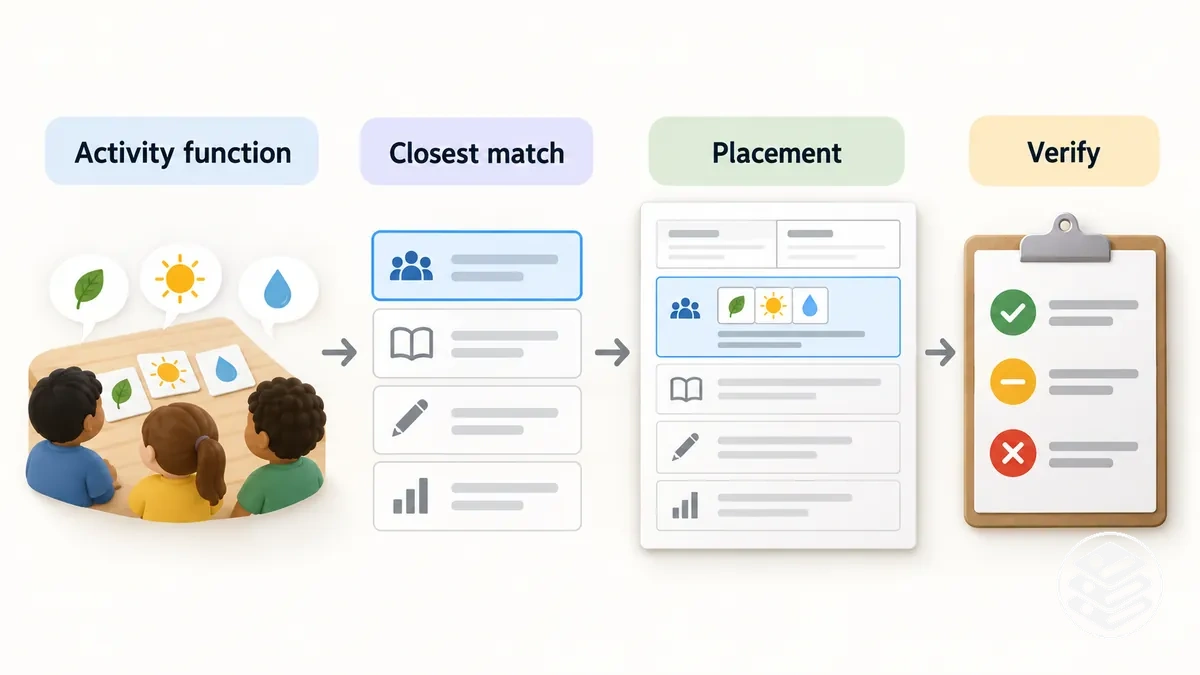
Use the following sequence to map information to field purpose without changing the required structure.
Each step narrows the placement by function, limits the entry to the detail the field requires, and ends with a check for omission or unnecessary duplication.
- Identify the instructional function. Determine what the activity or lesson detail contributes to the plan, because its function provides the basis for placement rather than the words used to describe it.
- Find the closest matching field purpose. Compare that instructional function with the purposes of the available fixed sections and select the closest match permitted by the form. If no field is an exact functional match, do not assume that a different field or structural change is permitted.
- Enter the required detail. Place the information in the selected fixed section at the level of detail that field requires or permits. Include what is needed for that field purpose without expanding the entry merely to repeat information recorded elsewhere.
- Verify the placement. Check that all information required for the selected field remains present and that the placement has not caused a required lesson detail to be omitted or duplicated unnecessarily. Where another field requires related information for a distinct purpose, retain the detail needed for that purpose rather than consolidating it automatically.
For example, the same classroom activity might be described in one fixed section by what learners do and elsewhere by the instructional function that the form asks the teacher to document; the wording and detail can therefore differ when the field purposes differ.
This method addresses placement inside fixed sections, while the broader process to complete a required template is a separate task; the final check here is whether each required detail remains recorded in the field that provides the closest functional match.
Match Each Activity to the Field's Instructional Purpose
Match an activity to a candidate field by comparing the activity's instructional purpose with the field purpose, not by relying on similarity between the activity wording and the field label.
A functional match exists when what the activity does in the lesson fits what the field is intended to record, and that relationship provides the placement rationale.
Small-group discussion
- When it functions as
- Learner participation
- Closest match
- A field whose purpose is to record learner participation.
- When the function changes
- If the discussion is used to check understanding, a field for evidence of understanding can be the closer match.
Written reflection
- Possible function
- A learning activity.
- Alternative function
- Evidence of learner understanding.
- Placement basis
- The instructional purpose and the candidate field’s purpose, not similarity between their labels.
Key distinction: the activity name stays the same, but its instructional function can change the correct field.
Preserve Required Headings While Adapting the Content Within Them
Preserve a required heading as the fixed label, and adapt only the content beneath the heading when the issuing rules permit it.
A permitted adaptation may change wording, examples, activity detail, or level of detail, but it does not by itself authorize a change to the required heading.
The permission boundary also applies to the entry format: if the form prescribes particular wording or a specific way of entering content, those constraints remain in force beneath the fixed label.
Here, a required heading means a required label inside the lesson-plan form rather than a web or document heading style; changing permitted content beneath that label is different from renaming or reordering the required label.
Handle Missing Sections Without Breaking the Required Format
When essential information has no dedicated section, first match it to the closest functional field whose purpose can accommodate that information, subject to the required format and its permissions.
The absence of an exact destination does not by itself permit a new section or make the information unnecessary.
- If an exact field exists: place the essential information there according to that field's purpose and entry requirements.
- If no exact field exists but a closest functional field does: place the information there when its function fits that field and the required format permits the placement.
- If no suitable field exists and notes or sublabels are permitted: use a brief permitted note or sublabel to record the information without changing the required structure.
- If no suitable field exists and permission for a note or sublabel is not stated: confirm the applicable local instructions before altering the structure; the placement gap alone does not establish permission to add a section.
For example, the same essential activity detail with no dedicated section might be placed in the closest functional field on a form that permits related information there, while another form may permit a brief sublabel or permitted note for that detail.
If neither option is permitted or the instructions are unclear, the placement requires confirmation rather than a structural change; final verification should check that the essential information remains recorded and that its placement follows the applicable format permissions.
Place Essential Information in the Closest Functional Field
Place an essential information item in the closest functional field by matching its instructional function to the candidate field's field purpose rather than relying on label similarity.
The strongest functional match is the candidate whose purpose best accommodates what the information does in the lesson, subject to any fit condition imposed by the required format.
- Instructional purpose: Check whether the information item's instructional function matches what the candidate field is intended to record; purpose fit should be the primary basis for choosing the closest functional field.
- Intended user: Check who needs the information and whether placing it in the candidate field makes it available in the part of the plan used for that function.
- Lesson timing: Consider when the information applies in the lesson when timing helps distinguish between two candidate fields with otherwise similar purposes.
- Consequence of omission or misplacement: Compare what would become unclear or disconnected if the information were omitted or placed in either candidate field; the placement implication favours the field that retains the information in its most relevant planning context.
For example, if an activity note could plausibly fit two fields, one may match the activity's instructional purpose more closely while the other merely appears suitable because of its label.
When both candidate fields have a plausible functional fit, the intended user, lesson timing, and consequence of misplacement provide the trade-off criteria for the placement rationale.
Record Learner Adjustments When No Dedicated Field Exists
Suppose an already-decided learner adjustment changes how a learner participates in a planned activity, but the required template provides no dedicated field for that adjustment.
Add Brief Notes or Sublabels Only When the Format Permits Them
Permission test for notes and sublabels
Use only when
- the required format permits that type of clarification;
- the note clarifies information already placed in a permitted location;
- it is necessary, clear and brief; and
- the required heading or field remains intact.
Do not use it to
- bypass a mandatory field;
- replace a required heading;
- create a parallel or new structural category; or
- move required information outside its expected field.
A note or sublabel is a secondary placement aid, not permission to redesign the required format.
Reduce Clutter Without Removing Required Information
Reduce clutter in a completed required lesson plan only after all required information has been preserved.
Shorten or consolidate content only when the change retains the required fact, the field function, and the mandated level of detail.
- Repeated wording: Remove duplicate wording when the repetition serves no separate requirement, then check that every required fact remains stated in the appropriate field.
- Redundant phrase: Shorten a phrase that repeats meaning already expressed in the same field when concise wording is permitted, while preserving any detail the field requires.
- Duplicate detail: Consolidate duplicate detail when allowed only if the affected fields do not require the information separately for different functions.
- Overlong entries: Keep each field as concise as its requirements permit, without removing information merely to create whitespace or improve scanability.
- Final clarity check: Read the adjusted entry in its field context and confirm that the required information, field function, and required level of detail remain clear.
The safe-adjustment test is whether the completed required lesson plan communicates the same required facts after the edit and still satisfies the purpose of each affected field.
For example, if a permitted entry repeats “Students compare two examples and identify the differences” twice within the same field without serving separate requirements, the repeated wording can be reduced to one occurrence while preserving both required actions: comparing the examples and identifying the differences.
Clarity is improved only within the limits of the form's requirements; the compliance check is preservation of the required fact, field function, and mandated level of detail rather than maximum brevity.
Confirm the Adapted Template Still Meets Its Required Format
An adapted lesson plan template passes this verification only when every required structural and informational constraint remains satisfied under the actual requirements of the issuing school, system, program, or form.
Verify the completed adaptation against those issuing rules rather than assuming that a change permitted in one format is permitted in another.
This compliance check is limited to whether the adapted form preserves its required format; it does not assess objectives, assessment quality, pacing, or overall teaching readiness.
Each checklist item applies a pass/fail condition to a stated requirement and identifies the corrective action required when the check fails.
- Required heading: Pass when every required heading remains present and unchanged where the issuing rule requires the label to remain fixed. If a required heading is missing or altered without permission, restore it according to the issuing rule.
- Required field: Pass when every required field remains present and contains the information that the applicable requirement assigns to it. If a required field is missing or its required information has been omitted, restore the field or information as the issuing rule requires.
- Permitted addition: Pass when each added note, sublabel, or similar annotation is allowed by the required format. If permission is absent or the addition changes the required structure, remove or revise it according to the issuing rule.
- Essential information: Pass when essential information remains recorded in an allowed location that matches its planning function. If its placement is not permitted or leaves required information absent from its expected field, correct the placement according to the form's requirements.
- Duplication: Pass when repeated information remains only where separate fields or requirements require it, and unnecessary duplication has been reduced only where allowed. If consolidation removed information required in more than one location, restore the required detail.
- Formatting rule: Pass when applicable local requirements for wording, ordering, entry format, or other prescribed presentation are still followed. If an adaptation conflicts with a stated formatting rule, revise that adaptation to meet the rule.
- Final verification: Pass when the adapted lesson plan template meets every applicable stated requirement above. If any check fails, correct that requirement according to the issuing rules before treating the format-verification process as complete.